
| Manufacturer | Redpark |
|---|---|
| Language of instructions | English |
| Product warranty | 1 year |
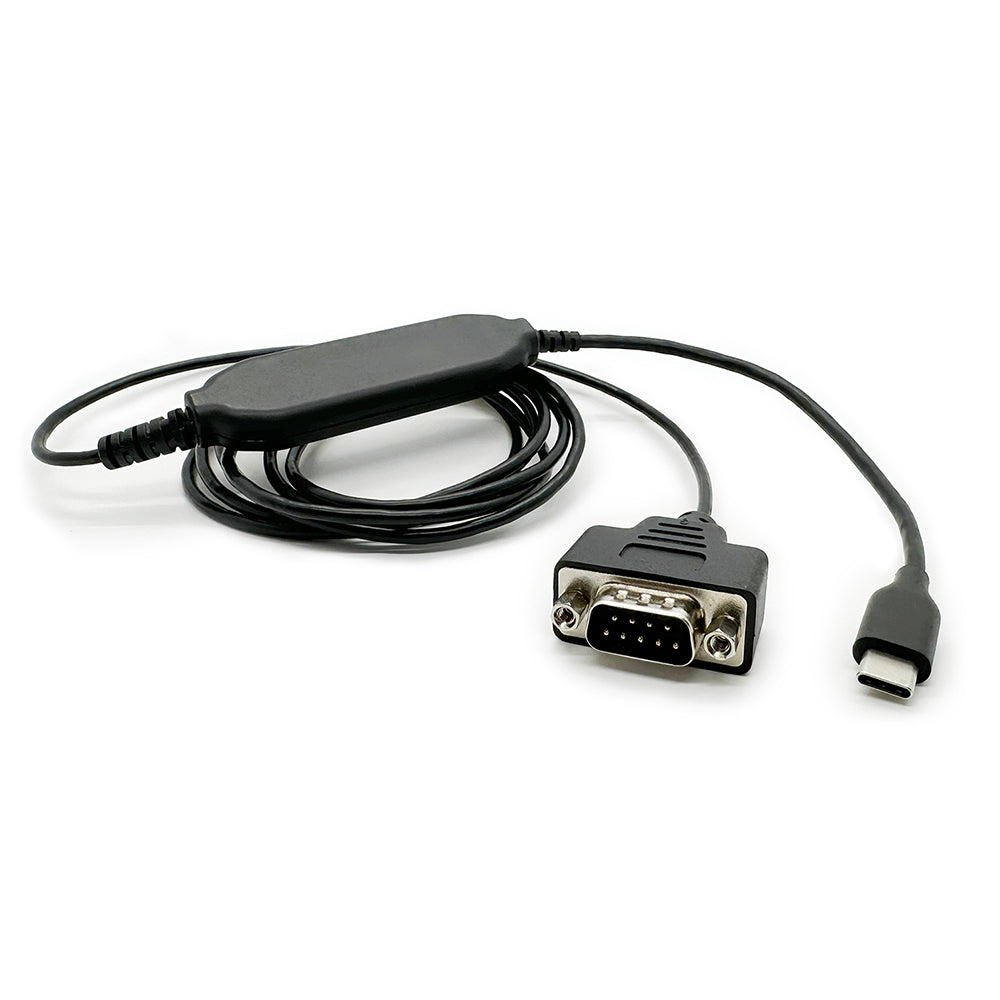
Redpark RS-232 Serial Cable for USB-C iOS Devices
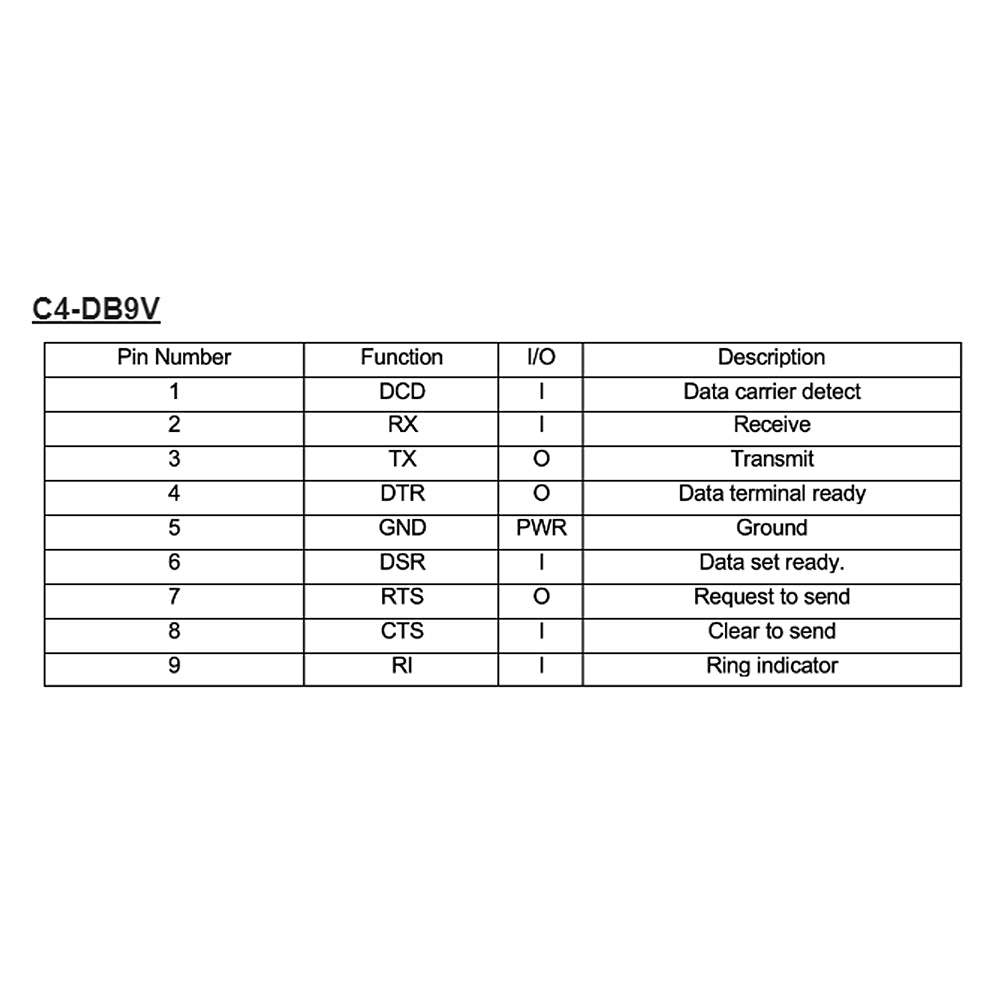
Redpark USB-C Serial Cable (C4-DB9V)
Product description
detail
Connect your USB-C iPad to RS-232 serial devices at baud rates up to 115.2Kbps.
This cable can be used in conjunction with the Redpark Serial SDK to create iOS apps that communicate with serial devices.
Licensed under the Made for iPod (MFI) program for private deployment under the terms of the Enterprise, Education, and Personal iOS Developer Licenses.
Under current Apple policy, this cable cannot be used with applications sold on the App Store.
However, you can distribute apps through Apple Business Manager and Apple School Manager.
support
If your Redpark cable isn't working properly, try the following troubleshooting steps:Turn your iPhone off and then back on. (Do not put your iPhone to sleep; power it off completely and then on.)
If the issue persists...
Make sure your iPhone/iPad recognizes the cable:
≫Connect the cable to your iPhone
≫Open the iPhone Settings app
Select "General" and then "About."
>>Scroll down the list. If your cable is detected by iOS, "Serial Cable" will be at the bottom of the list.
If your iPhone detects the cable:
Check the app you're using to make sure the communication settings (baud rate, parity, etc.) are properly configured. If you have questions about the proper configuration, contact the app developer.
If your iPhone detects the cable and the communication settings are correct but you are still experiencing issues, the cable may have a short circuit.
If your cable is still under warranty for one year, please contact our customer support.
If your iPhone doesn't detect the cable:
>>Make sure your iPhone case isn't preventing the cable from fully inserting into your iPhone's USB-C connector.
Use a toothpick or safety pin to remove any debris that has accumulated in your iPhone's USB-C connector.
Try using the cable on a second iPhone or iPad and see if you get the same results.
If the cable works fine with a second iOS device, the cable is likely fine.
If the cable does not work with a second iOS device and the cable is still under warranty, please contact our customer support.
FAQ
Q: What kinds of devices have serial ports these days?
A: Ham radios, dive computers, point-of-sale equipment, microcontroller platforms like Arduino, scientific instruments, data loggers, RFID readers, car engines, networking equipment like routers, blood glucose meters, fire alarm panels, irrigation controllers, weather stations, specialized printers, bathroom scales, temperature sensors, flight loggers, satellite radios, model cars (and even model boats, planes, and rockets), CNC machines, etc.
Q: What version of iOS is required?
A: The C4-DB9V requires iOS 14 or later.
Q: Is there a way to connect to a device using TTL (logic levels)?
A: Yes, by connecting an external RS-232 to TTL adapter to the DB-9 connector on the cable.
Q: Can I use this cable to power my iOS device?
A: No, please use the Serial + Power Adapter (L4-SERP) instead.
Q: Can I use this cable to power my serial device?
A: No power is supplied through the RS232 connection.
Some ultra-low power devices utilize the RS232 signal lines to provide power. This use of the RS232 connection is outside the scope of the RS232 specification and may not work in all cases.
It is up to the user to determine whether the RS232 output signal provides sufficient power for their particular application.
Currently, the C4-DB9V uses a MAX3243 or similar driver to convert logic level signals to RS232 level signals.
The MAX3243 specifications can be used as a rough guide to determine if signal levels are appropriate for your application.
Redpark reserves the right to change the RS232 driver circuitry at any time.
Q: What apps does it work with?
A: We provide a cable and a serial SDK so you can write your own app.
Q: Does the adapter work with apps available on the App Store?
A: Apple allows applications for use with USB-C serial cables to be deployed via Apple Business Manager and Apple School Manager.
However, you may not distribute your app via the public Apple App Store.
Q: How can I tell if my iOS device recognizes the cable?
A: Open the Settings app on your iOS device.
Select "General," then "About." Once the console cable is recognized by iOS, "USB-C Serial Cable" will appear in the list.
Q: How do I check what firmware version my cable is using?
A: After finding the USB-C Serial Cable in the Settings app, select the USB-C Serial Cable to view its parameters.
Product features
Serial Interface:Male DB9 Connector
Maximum baud rate: 115 Kbps
iOS:
Compatible with all iOS devices with a USB-C connector
Requires iOS 14 or later
Length: Approximately 1.8m
Product information
More Information
Extended Information
| Item Number | RDP-C4-DB9V |
|---|---|
| situation | New |
| Packing weight (g) | 453 |
Redpark USB-C Serial Cable (C4-DB9V)
¥15,380
(Tax included.)
¥
¥(/)
(Tax included.)
Also Recommended
This product has no reviews yet.
よくある質問と回答
ご不明な点がございますか?
ご注文後のお問い合わせはカスタマーサービスにご連絡ください
This product has no reviews yet.