

| Manufacturer | Redpark |
|---|---|
| Language of instructions | English |
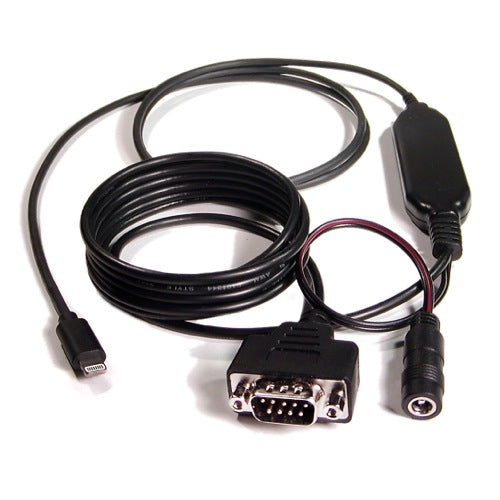
Redpark Lightning-enabled RS-232 Serial Cable for iOS Devices (Powered)
Redpark Lightning Serial+Power Cable (L4-DB9PV)
- For corporations and organizations considering bulk implementation: This product can be loaned for up to 30 days to corporations and organizations considering bulk implementation. Please use it for development testing before product implementation. Corporations and organizations wishing to borrow should contact our store with a description of their development plan and scale.
Product description
detail
Connect your Lightning iPhone, iPad, or iPod touch to an RS-232 serial device and a 5V power source. The Serial + Power Cable can be powered by an external 5V (20W) AC adapter or power supply.
This cable can be used in conjunction with the RscMgr SDK to create iOS apps that communicate with serial devices. It is certified under the Made for iPod (MFI) program for business, educational, and personal use. Current Apple policy does not allow this cable to be used with apps sold on the App Store.
FAQ
Q: What devices have serial ports?
A: POS devices, scientific equipment, data loggers, RFID readers, auto engines, routers and other network devices, glucose meters, fire alarm panels, irrigation controllers, weather stations, specialty printers, weighing scales, temperature sensors, flight loggers, satellite radio, amateur radio, model cars (including model boats, model airplanes, and model rockets), CNC machines, and more.
Q: What iOS version is required?
A: iOS 7.0.x or later.
Q: Is there a way to connect to a device using TTL (logic levels)?
A: Yes, by connecting an external RS-232 to TTL adapter to the DB-9 connector on the cable.
Q: What is the maximum baud rate this cable supports?
A: 115,200 Kbps.
Q: What are the specifications of the included power adapter?
A: The included power adapter is a switching power adapter (AC 100-240V, 50/60Hz) with a grounded 3-prong power cord. If you are using an existing power adapter, please make sure it is a 5V/4A output AC adapter or power supply with a DC power jack (barrel-style 2.5 x 5.5 x 11mm) connector. The included power adapter has the same specifications, but may have a different manufacturer or model number depending on when it arrived, or may be for overseas use only (it does not meet Japanese safety standards and cannot be used in Japan; the power adapter will have a label indicating it is for overseas use only). You cannot specify a power adapter when purchasing.
Q: Can I use my own power source?
A: The included power adapter supplies 5V to iOS devices in accordance with Apple specifications. While it is possible to connect it to an alternative 5V power source, it may not be able to charge the iPad. The Serial+Power Cable requires a 5V power source. Connecting the cable to an alternative voltage (e.g., a 12V output in a car) may result in the cable not working or may even be damaged.
Q: Can I use this cable to power my serial device?
A: No, power cannot be supplied through the RS232 connection. Some low-power devices can be powered through the RS232 signal lines, but this does not mean that all applications outside of RS232 will work. Currently, the C2-DB9 uses a MAX3243 or similar driver to convert logic level signals to RS232 level signals. It is up to the user to determine if the RS232 output signals will provide enough power for their particular application. The MAX3243 specifications may be used as a guide to determine if signal levels are appropriate. Redpark reserves the right to change the RS232 driver circuitry at any time.
Q: What apps does it work with?
A: The cable and SDK are provided so that customers can create their own apps.
Q: Will this cable work with apps available on the App Store?
A: Currently, this is not possible. This may change depending on Apple's policy.
Q: How do I know if my iOS device recognizes the cable ?
A: Open the "Settings" app on your iOS device. Select "General" and then "About." If the Serial+Power Cable is properly connected, it will appear in the list.
Q: How do I know what firmware version my cable is using?
A: Once you have found the Serial+Power Cable in the Settings app, you can select it to view its parameters.
Q: What is the pinout for a DB-9 connector?
A: It is provided in the SDK User Guide (English).
Product features
Model number: L4-DB9PV
UPC: 013964221299
Length: Approx. 2.8m
Serial Connector: Male DB9
Power Connector: DC power jack (barrel style 2.5 x 5.5 x 11mm)
Warranty: 1 year
Product information
More Information
Extended Information
| Item number | RDP-L4-DB9PV |
|---|---|
| situation | New |
| Packing weight (g) | 454 |
Redpark Lightning Serial+Power Cable (L4-DB9PV)
¥24,150
(Tax included.)
¥
¥(/)
(Tax included.)
Also Recommended
This product has no reviews yet.
よくある質問と回答
ご不明な点がございますか?
ご注文後のお問い合わせはカスタマーサービスにご連絡ください
This product has no reviews yet.