
| Manufacturer | Redpark |
|---|---|
| Language of instructions | English |
| Product warranty | 1 year |
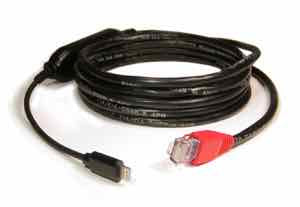
Redpark Lightning Ethernet Cable for iOS Devices
Redpark Lightning Ethernet Cable (L2-NET)
Product description
The Redpark Ethernet Cable is a special version of the USB to Ethernet adapter. This product provides a general-purpose Ethernet interface. However, please note that there are some limitations to its functionality, as detailed below.
This cable is designed for field service use and is intended for developers and engineers (not a consumer product). Field technicians can connect their iPad or iPhone to field equipment using Ethernet.
The cable is compatible with all iOS apps that use Redpark's RedSocket SDK. Available on the App Store, apps like "Get Console" (a terminal emulator), "SecureCRT," "ENET Browser" (a web browser), and "Luminair" (a lighting control app) can be used with the Ethernet cable. Other apps are in development by third-party developers.
*The "Get Console" app is a product of Cloudstore Limited (Amix Capital Limited), the "SecureCRT" app is a product of VanDyke Software, Inc., the "ENET Browser" app is a product of Jose Arellano (LunarAlpha), and the "Luminair" app is a product of Synthe FX. For support for these apps, please contact the respective developers.
For more information on cable functionality and app compatibility, please see our Ethernet Cable FAQ below.
Length: Approx. 213cm
Ethernet Cable: Cat5e with RJ45 Auto-MDIX connector
Maximum bandwidth: 5 Mbps
Ethernet Cable FAQ
Q: Why can't all apps be used with this Ethernet cable?
A: Currently, Apple does not expose a way for accessories to access the native iOS network stack via the Lightning connector. Therefore, Redpark had to develop a secondary network stack for this cable. Only apps that use Redpark's RedSocket SDK can communicate with this secondary network stack. This means that only apps that use this SDK can communicate with this cable.
Q: Are there any functional drawbacks to using a secondary network stack?
A: In most cases, no. In fact, there are some advantages. However, the network stack currently lacks SSL support. (Note: There is nothing stopping app developers from adding SSL support if it is important for their deployment.)
Q: Can I use this Ethernet cable and WiFi at the same time?
A: Yes, this Ethernet cable uses its own network stack and does not affect the native iOS network stack.
Q: Can I use this Ethernet cable to connect my iOS device to the internet?
A: It is not impossible, but it is not recommended. This type of use is possible by using an app such as "ENET Browser" available on the App Store, or by developing your own app and connecting it to an internet-connected device (such as a router or hub). However, since this cable is intended for developers and engineers and has a limited maximum bandwidth, it would be more efficient to use a wireless LAN access point instead of this cable.
Q: Can I use this Ethernet cable to charge an iPad or iPhone?
A: No. This Ethernet cable is for data communication only. It is intended for users who need a temporary connection to an Ethernet device or network.
Q: Can I develop my own app?
A: Yes. The RedSocket SDK is available as a free download from the Redpark website . Your apps can be deployed to the App Store or privately under the terms of a Personal, Education, or Enterprise Developer License.
Q: What version of iOS is required?
A: Requires iOS 8.0.x or later.
Q: Why is the maximum bandwidth limited to 5 Mbps?
A: To comply with Apple's "Made for iPhone (MFI)" power consumption specifications, Redpark made many design decisions in this Ethernet cable to reduce power consumption. These power savings come at a cost in performance.
Q: Will this Ethernet cable connect to any Ethernet hub or switch?
A: This Ethernet cable supports 100 Mbps Ethernet connections. It is compatible with any hub or switch that supports 100 Mbps Ethernet.
Q: Does this cable have a unique MAC address?
A: Yes, each cable is programmed with a unique MAC address during the manufacturing process.
Q: How can I check if my iOS device recognizes this cable?
A: Open the "Settings" app on your iOS device. Select "General," then "About." If your Ethernet cable is connected properly, it will appear in the list on the screen.
Q: How do I know what version of firmware this cable is using?
A: Once you have found this Ethernet cable in the Settings app, select it and its parameters will be displayed.
Product information
More Information
Extended Information
| Item Number | RDP-L2-NET |
|---|---|
| situation | New |
| Packing weight (g) | 454 |
Redpark Lightning Ethernet Cable (L2-NET)
¥8,480
(Tax included.)
¥17,100
¥(/)
(Tax included.)
Also Recommended
It has received 1 review.
よくある質問と回答
ご不明な点がございますか?
ご注文後のお問い合わせはカスタマーサービスにご連絡ください
It has received 1 review.